Tuesday, July 31, 2007

Managing Snort Rules

I know many people like to use Oinkmaster to pull in rule updates, manage rules, etc. - and I am no different. But....one thing I tend not to do, is maintain numerous Oinkmaster configurations for various hosts. Let me elaborate on a rule management scheme for Snort signatures that I find easier to manage.

Let's say we have five Snort sensors deployed, watching various different types of networks and hosts - and thus requiring vastly different rule tweaks and tuning. Each of these sensors is going to require both some of the same and different rulesets and individual rules to be loaded. You could let Oinkmaster handle this or you could use thresholding within Snort itself.

Example Architecture:

  • Download new Snort signatures daily from snort.org and BleedingThreats via Oinkmaster, disabling rules that you globally do NOT use (with disablesid lines).
  • Run these new rules through a loaded Snort configuration (basically a config with most everything turned on), in testing mode ( -T ). Potentially quarantine or notify a rule maintainer that new rules are available.
  • If the new rules pass the Snort testing phase, make these rules centrally available - possibly via a revision control repository, scp, or packaged (rpm, deb, etc.).
  • Have your sensors check for new signatures at various intervals (using revision, timestamp, or version to decipher if a new ruleset is available). Let Snort restart with the new rules.
Here's the per-sensor tweak:
  • Utilize thresholding in Snort to suppress or threshold rules that affect less-than-all of your sensors. Have a look at threshold.conf that comes along with the Snort tarball.
So essentially, this approach, relies on one server to update and maintain centrally, new Snort signatures. A rule that can be removed from all sensor configurations is done so at the Oinkmaster level, while rules that affect anything but all of the sensors is handled at the sensor level in threshold.conf.

Here is the caveat and where many people take exception to this process: it isn't as efficient on the Snort detection engine itself. When rules are removed at the Oinkmaster level, they are never loaded into the Snort configuration. However, when suppressed via Snort thresholding, it happens post-processing (ie. Snort has already detected a hit on the rule, and it then decides it should be suppressed).

So the moral of the story is, if you have the spare cycles in beefy sensors that are not bogged down with the traffic they are watching - then you can benefit from the administration ease and having rule modifications stay close to the sensor for view, etc. If your sensors are already taxed, you should really use Oinkmaster all the way through.

Monday, July 23, 2007

High Availability Prelude Central Services

I recently posted to the Prelude wiki, a sample configuration for providing high availability for your central Prelude services.

Basically what the configuration provides is a setup across two servers to host these services: Manager, Correlator, Apache, MySQL, and Prewikka. It is purely a fault tolerant scheme, as opposed to a performance booster. Although, you could spread the load to increase performance - such as with a split of the web interface to one while the other provides database interaction for incoming events, or offloading things such as reporting and backups to the secondary.

MySQL v5 is required to avoid potential auto increment collisions when doing multi-master replication. Other than that, there really should be minimal changes needed for using various versions with regards to the other software pieces. Either host in the pair, is capable of taking over as the primary - only caveat is heartbeat is for machine failure, not service failure. So....you will still need your application-level monitoring (ie. Nagios or other snmp-based solution) in place to be notified of service issues.

Saturday, July 14, 2007

Changes of the Seasons


When the seasons change in New England, there are distinct things you notice - such as the chill in the air as the leaves change in fall, to the rainy months of early spring. Most changes are anticipated, but as New England weather goes, you always expect the unexpected - you can just as easily get snow in April or have warm January days. Where I am going with this is in relation to Network Awareness, the ability to notice changes, additions, etc. from endpoints on your network - whether this is new ports, increased protocol activity, or just actively getting to know the hosts making use of your network.

Much like the weather in New England, the network activity of your hosts is at many times predictable, but there are also the numerous anomalies that appear every day - hosts that shouldn't be running a web server, or increased activity from an IP address. Alerting on, and profiling these anomalies, is what I am getting at with this Network Awareness approach. Basically, utilizing existing tools (nessus, nmap, p0f, etc.), with storage (mysql, text, etc.), and custom tools (perl, c, etc.) to build profiles, notice trends, and generate alerts.

Maybe there are open source tools already in the this space (do you know of any?), but it also is a task that benefits from the flexibility of a home-grown process - as each network and set of endpoints is so vastly different nowadays.

Things of interest (have any others?):

* Build profiles and store all interesting events in a database, both for maintaining history, state, and future correlations

* Analyze various sources of data for various types of items

* Sources of Data:
  • nessus: both for assessing and verifying compliance, provides a baseline
  • nmap: actively profile port openings and OS detection
  • p0f: passively identify OS
  • tshark: for traffic profiling and statistics
  • pads: passively noticing new services offered
  • argus: counting hosts, ports, traffic, etc.
  • various others, including netics or fl0p
  • custom: for mining logs, running comparisons, etc.
* Important Items:
  • tcp and udp ports
  • ip addresses
  • services offered on those ports
  • identifying operating system usage
  • traffic patterns
  • establishing normal usage profiles on traffic, endpoints, and potentially users of those endpoints
* Establish signatures to build these profiles, notice trends, and spot anomalies


This is not an idea based on real-time alerting or analysis, but a crunching of various data to cast a light over areas that deserve attention or investigation. I guess the operative word here is change. Change can be good, especially when making improvements, but in our context, we are looking for those changes that indicate something unauthorized or outside the scope of a security policy. Services and people many times operate in a set pattern with noticeable characteristics...let's find the anomalies.

Friday, July 6, 2007

Brute Forcing SSH Passwords with Hydra


Quite often you may find the need to audit passwords without grabbing a copy of the hashes, or maybe need to generate a simulated brute force attack to test one of your sensors or correlation engines. In from stage left steps THC-Hydra, the self-described "very fast network logon cracker which supports many different services."

If you are familiar with BackTrack, running Hydra from within is quite easy, located under the online password cracking tools. Otherwise, Hydra can be built from source, just make sure to have openssl and ssh libraries installed for it to be compiled against - as usual, the configure script will let you know which libraries are lacking on your system.

Much like nmap, and the gui front-end for it, Hydra can be run from either the command-line or with a simple GTK gui wrapper. The only change necessary is to have X working, and specify xhydra as opposed to just hydra. I'll use the command-line options in this post, as the gui makes it extremely easy to figure out the options, etc. In fact, using the gui will actually build the hydra command-line for you to see how it is configured to run.

Numerous services are supported for cracking in the latest version of Hydra, which is 5.4 at the time of this post. Although we will use ssh2 in this example, other network services such as cvs, ftp, imap, mysql, ldap, and http are also available. So let's move on to running an over-the-air ssh password attack (exercise caution if you lock out accounts, or have other account policy settings in place)

A simple one-off username/password combo:

hydra 192.168.1.25 ssh2 -l foohacker -p bluebird

The above attempts to login over ssh v2 to 192.168.1.25 as foohacker with password of bluebird.

Quick alteration to utilize lists:

hydra -M targets.txt ssh2 -L users.txt -P passwords.txt

So...now we have replaced the single setting for each and allowed ourselves to brute force ssh login with a matrix of users, passwords, and hosts. I specify a single item per line in my flat text files when using these lists.

A couple options worth mentioning:

-f allows you to exit hydra once a match is found
-t allows you to manipulate the number of tasks it runs in parallel. from the readme, experimenting with this feature can result in improved speed or in disabling the service, :)

Have a look here and here, to learn more about the options, download source, and view changelogs.

Sunday, July 1, 2007

Prelude Registration Server


As anyone who has used Prelude, you will know that registering a sensor with a Prelude Manager/Relay, is the first step in having your sensor send alerts into your Prelude framework. Usually a combination of, (a) running 'prelude-adduser registration-server' on the manager/relay, and (b) running 'prelude-adduser register' on the sensor you are adding - followed by accepting the registration on the manager, etc.

In this post, I will show a quick way of setting up a pseudo-daemonized instance of the Prelude registration server, that will auto-accept the sensor registration. This comes in handy when you have a bunch of sensors to register, yet you don't want to constantly be going back to the manager console to acknowledge each individual sensor registration.

On the manager side, first install the screen utility.

Continuing on the manager machine, I usually create an init script, that has the process being the following:

/usr/bin/screen -d -m /usr/local/bin/prelude-adduser registration-server prelude-manager --passwd=somepassword --keepalive --no-confirm

What this command says is, have screen fire up this prelude command while detaching the screen session - thus putting it in the background, much like a daemonized process (ie. not running active in your console). The 'prelude-adduser registration-server' command runs using the prelude-manager analyzer profile. The key additions to the command, are the use of a pre-shared password, and the keepalive and no confirm options. The pre-shared password is used by the sensor registering, and the no confirm eliminates the need to accept the sensor registration on the manager each time. Finally, the keepalive option, does not cause the registration server to exit after a single successful registration on the manager side.

Finally, running the following on the sensors needing to register (in this example, a snort sensor):

prelude-adduser register prelude-snort-profile "idmef:w admin:r" 192.168.1.2 --uid snort --gid snort --passwd=somepassword

The above does the normal sensor registration pieces of specifying the profile in use, prelude permissions to use, and user/group to allow access to the sensor profile. The important addition, is the use of the pre-shared password that was specified in the registration server running on our manager.

Friday, June 29, 2007

Snort starter configuration

Everyone has their own ways of configuring up a new Snort IDS sensor, below is a glance over the base options that I feel should be given some attention when first deploying. This applies to the 2.6 strain of Snort.

HOME_NET variable

var HOME_NET [192.168.1.0/24,192.168.25.25]

The general rule to keep in mind when setting the HOME_NET variable is to specify the networks or hosts you are protecting. For example, if watching a gateway where your local network resides on one side, and the Internet on the other - HOME_NET would be set for your local network address.

EXTERNAL_NET variable

var EXTERNAL_NET !$HOME_NET

I generally set my EXTERNAL_NET variable to be anything not in my HOME_NET. Essentially, anything that is not in the "protected" zone for this sensor. There are exceptions to this rule, for example, a highly subnetted internal network that may have other sensors watching elsewhere or that you generally are not interesting in watching traffic from with a network IDS.

Service-specific variables

var DNS_SERVERS [192.168.1.5,192.168.1.6]
var SMTP_SERVERS [192.168.25.50]

var HTTP_SERVERS [192.168.1.100,192.168.1.101]


Next comes the groupings of service-specific variables. There are two main reasons for getting these as accurate as possible pertaining to the network you are watching with this sensor. First, they will make the potential alerts more accurate - think less false positives, because you are only looking for DNS-related alerts against DNS servers (if the rules are written with these variables used of course). Second, they will make your Snort engine more efficient. Instead of applying certain rules against all IP addresses, if a rule is written to watch for a certain HTTP exploit and specifies the HTTP_SERVERS variable in the rule, it will only be applied against those specific servers. Any limits you place on what Snort has to match against, speeds up the whole process.

Service-specific port variables

var HTTP_PORTS 80
include coldfusion.rules
var HTTP_PORTS 8080
include coldfusion.rules

I won't spend time here, but the same principles that apply to the service-specific variables for IP addresses in the section above, also apply here for various ports. *Note that each port definition must be defined separately and with each rule set bound to it, unless using contiguous ports - such as 80:85.

Detection Engine memory usage

config detection: search-method ac-bnfa

Various options can be used here that both directly affect the performance of the detection engine and the resources it uses. Utilizing ac-bnfa is becoming both the default recommended setting from various sources, and I can attest to having the best globally acceptable expectations across numerous platforms and hardware. It is rated at "low memory, high performance".

frag3 preprocessor

preprocessor frag3_global: max_frags 65536
preprocessor frag3_engine: policy windows bind_to [192.168.10.0/24]
preprocessor frag3_engine: policy linux detect_anomalies

The frag3 preprocessor handles IP fragmentation and attempts to thwart the various IDS evasion techniques that utilize fragmentation. The key thing I want to point out here, is the policy bindings. Different operating systems, implement TCP/IP in different ways, and thus handle IP fragmentation in different ways. The frag3 preprocessor is a target-based preprocessor that allows you to let the IDS see the reassembled packets in the way the target OS will. The first policy statement above applies a "windows" policy, which Windows happens to follow for example. The last policy statement without the bind_to, applies to all other target IP addresses other than our 192.168.10.x network.

Perfmonitor preprocessor

preprocessor perfmonitor: time 300 file /data/snort/snort.stats

As its name implies, this preprocessor measures performance. Things such as CPU usage, packet counts, and my favorite - drop rate, are measured here. The above configuration line tells the perfmonitor preprocessor to write out statistics every 300 seconds to that particular file.

sfportscan preprocessor

preprocessor sfportscan: proto { all } ignore_scanned { 192.168.1.22 }ignore_scanners { 192.168.1.150 } sense_level { low }

Not everyone feels it necessary to run this preprocessor, especially on internal network segments, where portscans should be less of an issue - but a few tuning options can go a long way. Utilizing the ignore_scanned and ignore_scanners options, can reduce portscan alerts generated by sensitive targets or sources - for instance a vulnerability assessment scanner. The sense level can be raised to higher levels to detect slow scans, but at the expense of generating more false positives - whereas setting to low will only watch for error responses from the targets of a potential scan, making this option much less noisy.

Removing unnecessary rule sets

include $RULE_PATH/smtp.rules
include $RULE_PATH/coldfusion.rules


One of the best ways to improve performance of your sensors (ie. reduction of dropped packets), is to globally remove rule sets that are not pertinent to the hosts you are protecting with this sensor. For example, do NOT include coldfusion.rules if you do not have ColdFusion servers you are protecting. Remove or comment out those rule sets that are not necessary from your snort configuration altogether.

Use of Bleeding Threats rule sets

No:

include $BLEEDING_RULE_PATH/bleeding.rules

Yes:

include $BLEEDING_RULE_PATH/bleeding-attack_response.rules
include $BLEEDING_RULE_PATH/bleeding-dos.rules


Much along the lines of globally removing rule sets that do not pertain to your environment, is if you decide to use Bleeding Threats rules, do not use the large, all inclusive bleeding.rules. Select only the individual rule sets that you are interested in using.

thresholding/suppression

suppress gen_id 1, sig_id 1231, track by_src, ip 10.10.10.10
suppress gen_id 1, sig_id 573, track by_dst, ip 192.168.1.20

I will get into this area in a future post in much more depth, but utilizing threshold.conf for both thresholding and suppression can be extremely beneficial. If you have a Nagios server that constantly trips an alert for an SNMP rule against a certain router, consider utilizing a suppression to remove this particular instance from alerting, while still allowing other hosts to trigger this rule.

Conclusion

There are numerous configuration options within Snort, and this post only touched upon the few that I feel are most immediately useful with the tweaks above. Every sensor and network is different, for example, performance tuning the stream4 preprocessor or tuning http_inspect for particular ports, will be more or less important in various situations. Utilizing a base Snort configuration, tweaking as necessary to tailor for both resource constraints (bandwidth, processor, memory) and network profile (types of servers and traffic, nature of environment, etc.), will make your Snort IDS sensor much more useful.

Saturday, June 23, 2007

How NSM Saved Christmas

Introduction

'Twas the night before Christmas....well...not exactly. This is a real-world account of how I used open source tools and the foundation of Network Security Monitoring to save my chances of attending the company Christmas party. It was a few years ago in the middle of December when the incident that follows occurred, only but a couple hours before I was set to attend the party. Luckily, the practices of NSM were already in place, trimming down the time needed and stress endured considerably, while scoping the extent of the damage.

For those not familiar with the concept of NSM, I highly recommend the blog and books of Richard Bejtlich, security guru and NSM evangelist. The basic principle that NSM boils down to, is to not rely on a single point of network data for detecting and responding to your intrusions. So instead of collecting only alert data from your IDS, you supplement this alert data, with session or flow data, full content, and potentially statistical data.

In the scenario that follows, NSM was employed using various open source tools, including Sguil, Snort and SANCP. If you have never used Sguil before, you are in for a treat - as it ties together the Snort alerts, with corresponding SANCP session data and another Snort instance capturing full content data.

The First Hint

"CHAT IRC channel join", those four words is how it all began. Normally, a Snort alert of that nature would not have caused me much concern - mainly, since many co-workers and myself used IRC on a daily basis. The source IP address, however, made it all the more frightening. It happened to be a Debian FTP server we had in our DMZ, which would have absolutely no reason to be running an IRC client legitimately. Could it be an employee that was doing work on the server, deciding to install an IRC client on it and connect from there? Or, was it something more sinister, like that of a compromised Linux box joining a botnet?

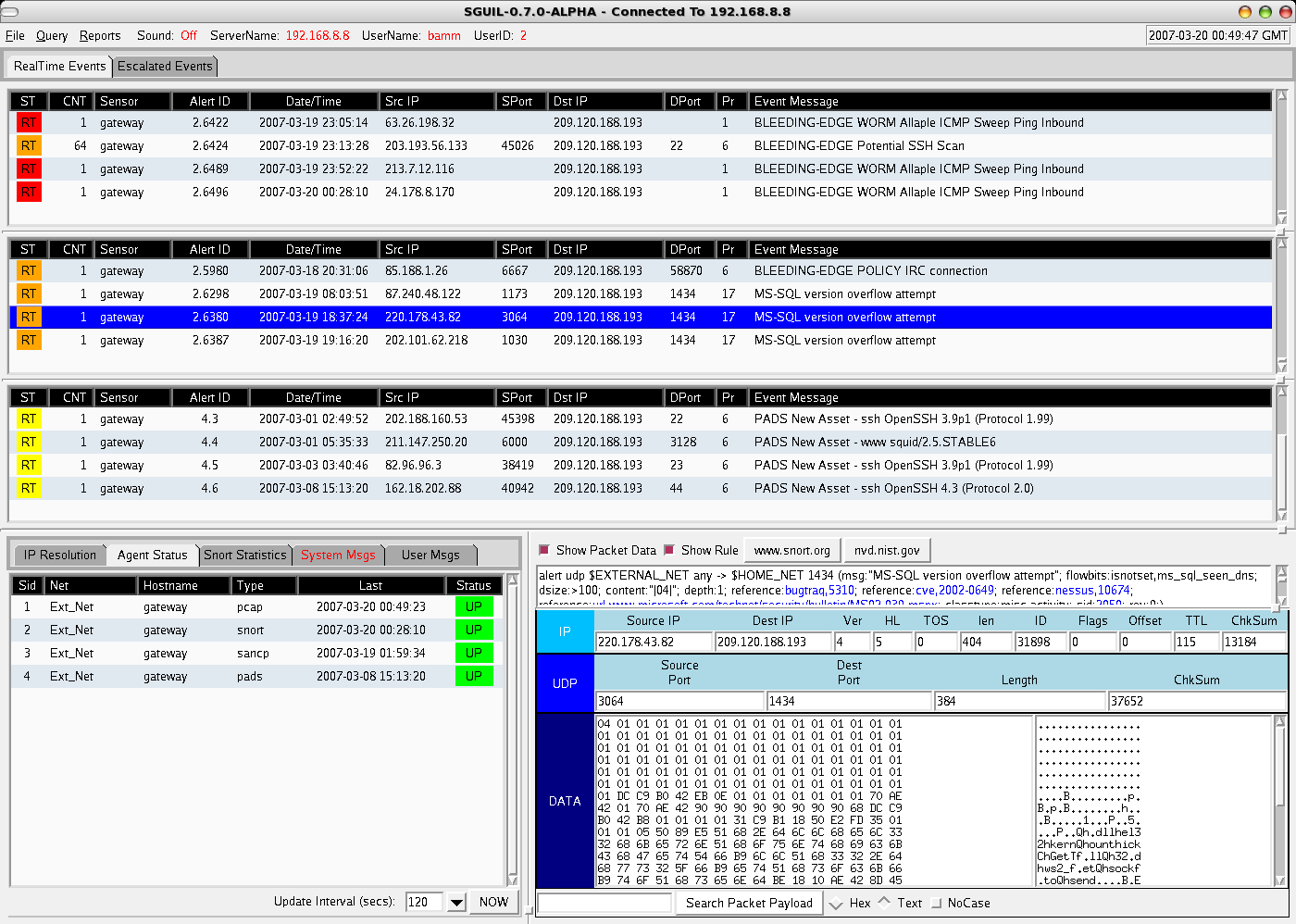
The first thing that led me initially away from it being an insider doing something they should not be, was in the packet payload - viewable via Sguil from the Snort alert data collected (a sample Sguil packet view of a generic alert is shown here on the main Sguil site). A random jumble of characters for the nick used to log onto the IRC server, this is seeming stranger by the minute. Why would someone that worked here use a random character string and join a channel that did not make any more sense than the nick? From knowledge of working on the FTP server recently, I knew that there was a limited exposed attack surface, only TCP ports 21 for FTP and 22 for SSH were listening.

In an all too common occurrence when an IDS is deployed, our investigation without touching the server in question would most likely be over. Sure, we could have been collecting logs centrally or had some sort of host IDS installed, but using network sensors that were collecting various data, allowed us to solve this from a 3rd party point of view at the network level. Luckily for us, we had NSM already in place, so in addition to the Snort alert we saw, we were able to dig deeper into the session (ie. flow) data and full content data to further analyze what exactly was taking place.

Tracking Down the Compromise

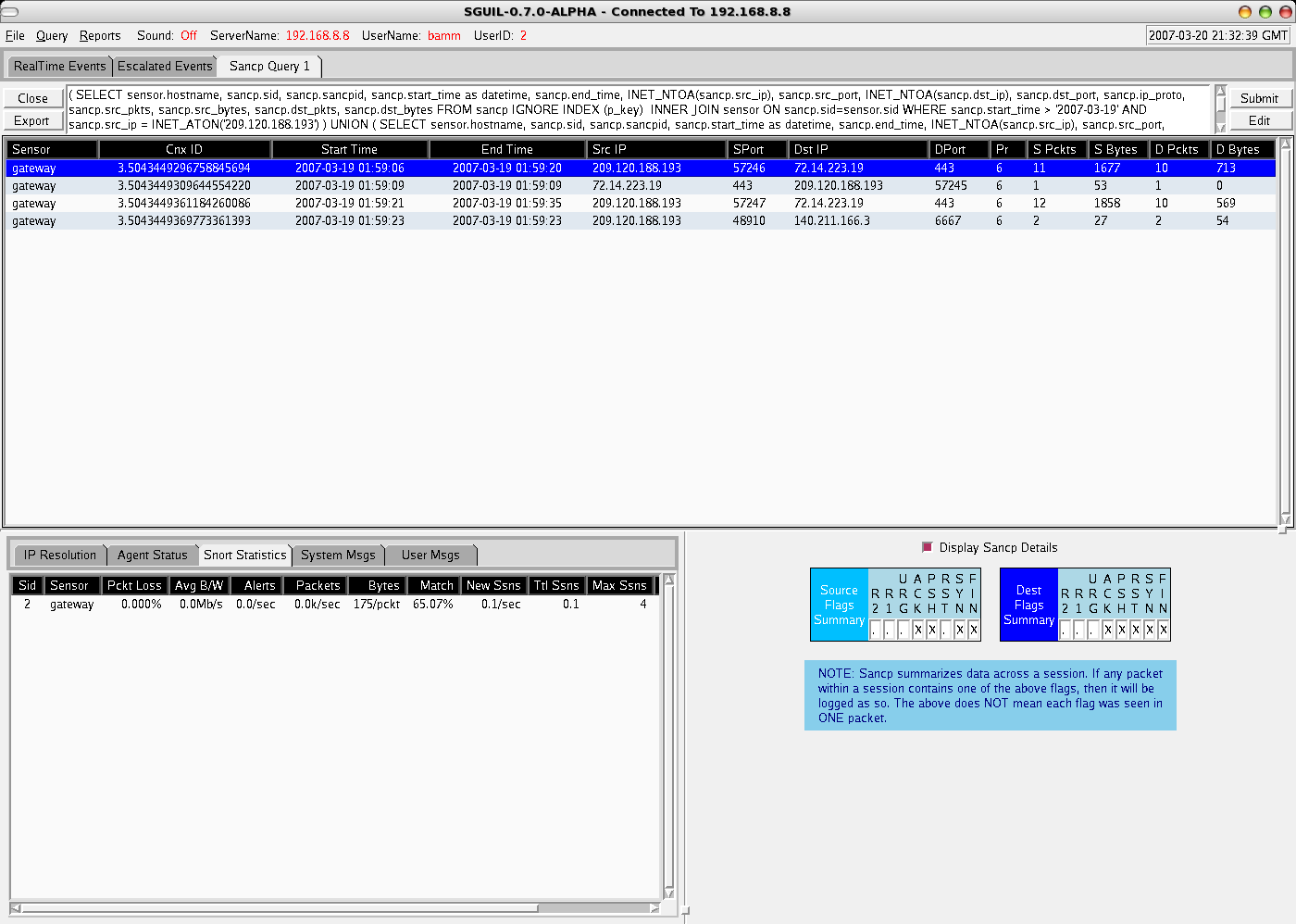
So where did I go from here? Well...I first decided to query for any Snort alerts, on both the source and destination IP addresses for the last week - nothing of any use came back. The next step was to pull any session/flow SANCP data from Sguil's database of all connections in the last week involving our victim machine. Sguil's SANCP view, looks like this sample from the Sguil website, and includes data formatted with the following headers:

Start Time End Time SrcIP SPort DstIP DPort SBytes DBytes

From the SANCP data returned, we could see numerous connections from external addresses with very little data being exchanged to tcp port 22 of our victim machine, especially from the destination side (this is classic of SSH brute force attempts, and confirmed from central logs from the victim host). The real interesting flow results, were the sudden stop of excessive SSH connections, followed by a connection to an external FTP server and a public IRC server! Now we are getting somewhere!!

One of the best things of working with Sguil, is that we can right-click any SANCP session and request the full-content data related to it (either in full capture view via Wireshark or output in a transcript window if an ASCII-based protocol, such as HTTP, SMTP, FTP, etc) . Within a traditional Sguil setup, you have a separate instance of Snort constantly recording pcap data to hourly files, which Sguil then applies the appropriate BPFs to get the correct data requested by the analyst using the Sguil client.

With full-content data at our disposal, we immediately requested the transcripts of the IRC and FTP sessions (a sample generic transcript screenshot can be seen here from the main Sguil site). Within the FTP transcripts we notice various tarballs being downloaded (with names of not any popular software), which ironically, can be fully regenerated from the full-content data we have collected with open source tools - but that is a topic for another post. Furthermore, the IRC transcripts confirm our earlier IDS alert that suggested the victim host had in fact joined up to the popular Freenode IRC network, joining both an obscure channel and with an equally obscure nick. Forensics performed later on a copy of the hard disk showed a custom IRC client with various "enhanced" drone abilities.

So what did we learn here? As you can see, having full content data made diagnosing the issue at hand, extremely easy. But what if you don't have full content data or all the communication had been encrypted?? That is why the flow data is so important. Even eliminating the full-content analysis we did above, we were still able to find out various important things just from SANCP flow data, enough to get a sense of what had happened, including:

1. Noticing plenty of source-heavy, quick SSH connections from external addresses - implicating SSH brute force attempts to login against an account.

2. A sudden stop in the rapid SSH connections, followed by an FTP connection to an external IP address and pulling substantial amounts of data to the victim system.

3. Connection to IRC, from a machine that shouldn't be.

Scoping the Extent of the Incident

The final step before taking this machine out of service, to both be forensically analyzed and rebuilt from known good sources, was to scope the extent of the damage.

Once again, we turned to the flow data in Sguil provided by SANCP. The following steps gave that "warm, fuzzy feeling" that we were okay:

1. Lookups across the SANCP database table that involved any communication from all external IP addresses involved. This included, the original SSH brute force scanner, which also happened to be the box they logged into SSH with once successfully cracking a password. Also the FTP server the tools were grabbed from and IRC server they connected to. Nothing beyond the time frame and machines we had already been investigating gave cause for alarm.

2. The victim machine, our Debian FTP server in the DMZ, had its IP address searched across all of the SANCP data available as well - with importance placed on connections both 72 hours prior to the successful compromise and anything thereafter. With importance this time placed on looking for such things as attacks on other DMZ hosts of ours in the same accessible subnet, to scanning of external hosts on strange ports.

3. Finally, a search across the SANCP table for other hosts in the same DMZ subnet. Looking for any protocols used or communications that appeared out of the norm.

Having centralized logs, HIDS, rootkit checkers, etc. are an ideal situation to compliment network based evidence, but if given the choice, a properly deployed NSM sensor is my first course of action when responding to intrusions. Just utilizing our NSM tools, we determined what happened to the machine, what it did, and scoped the extent of the intrusion.

After finishing our network-based analysis, we had a look at our central log server. The syslog data confirmed, shortly after the brute force attacks, and at the same time as the network data showed the last bits of SSH communication - a successful login on an unprivileged account. The files downloaded via FTP to /tmp, which included the custom IRC bot client, all with permissions and ownership of this compromised, unprivileged account. A successful grinding of a weak user account password over SSH had been the way in, with the common post-attack scenario of it being joined to a botnet army of drones, the result.

Conclusion

Hopefully this article has sparked an interest in enabling your IDS sensors to do more, and provide you with a broad way of investigating incidents. Once you move away from the alert-only mentality of a traditional IDS, you will find even more value in the data that tools like Sguil provide. For more information on NSM and the various tools that can be used, I point you again to Richard Bejtlich's books and the Sguil/NSM wiki.

* All of the network forensics (ie. non-local), were completed in only a couple of hours, leaving plenty of time to have fun at the Christmas party!

Basic Pig usage to process Argus data

Some quick notes on testing out Pig in local mode to process some basic Argus data. Argus Capture a sampling of network traffic with Argus a...